
Why do I need an account (Village ID)?
At Greatest Good Tarot, we have designed and developed a more streamlined and secure approach to our services.
Little Background (Reasons to the Madness)
We have also based our website, on the original BBC website, which was actually multiple “mini-sites” under one domain name – all running independently of each other – but working as one. This means more flexibility of services we can offer and more stability for the site with all the secret saucy tech needed to run all the features hidden underneath the pixels.
Simply put, the Greatest Good Shop is actually a completely separate site to About Greatest Good Tarot or Greatest Good Resources. But they all are able to work as one, because, in part, of the Village ID system. All these mini-sites run together using one universal username & password – the Village ID. Otherwise, you’d need multiple usernames / passwords for each site, and that would be painful, everyone would pull out their hair, and this is how wars start.
Plus, if we need to update a particular service or area of the site, it should mean that only one section is under maintenance / affected, and not the whole site.
There are multiple reasons why you need a Village ID, here are just a few examples:
- You can browse our shop for all the products/services we offer, add them to the cart like any other store, and pay securely. Once your video reading is ready, you’ll be sent an “Order Complete” email. This will mean it’s time for you to need your Village ID to log back in to the site, to access your private, personal reading directly from our secure servers – known as “My Readings”.
- If you support Greatest Good Tarot on a monthly basis at Pilgrim, Protector or Prophet levels, your Village ID will unlock extra material that you have purchased – both here across the site, and on our Discord Server.
- You need a Village ID to comment anywhere on our site.
- You need a Village ID to play the Greatest Good Game, will unlock extra parts and facilities of this site to help you play.
What is the difference between Pleasants, Pilgrims, Protectors, Prophets, Elites and Enlightened?
For the longest time, we have had the Twitch Sub Tiers, and the Pleasants, Pilgrims, Protectors and Prophets here on the site – and all was well. Now, we have a new group of lovely people on YouTube via their Memberships service.
The simple rule to follow (how we remember at least): E’s are on external platforms, P’s are on the Greatest Good Tarot site via Village ID.
- Twitch Sub Tiers (Signup here on Twitch)
You are known as “Village Enlightened”, as the work on there is primarily free tarot readings. Due to the unique way Twitch works, there are three tiers: Awesomely Enlightened (Tier 1), Extremely Enlightened (Tier 2) and Supremely Enlightened (Tier 3).
Highlights of benefits include additional emotes, some levels get ‘auto fast pass’ in the queue for readings, and all get an ad-free experience. - YouTube Members (Signup here on YouTube)
You are known as “Village Elite”, as you are gaining access to more videos via YouTube Channel. Unlike Twitch, there is one level of Village Elites – so you either ‘have it’ or your don’t. YouTube Village Elite Members gain access to additional Current Event Readings, Prediction Readings as well as exclusive General Vibe Readings. - Pleasants, Pilgrims, Protectors and Prophets
All your benefits can be found on the Greatest Good Village page – depending on level.
Important to note: ALL paid members, no matter which platform you support the Village from, get the same benefits unlocked on the Discord Server. Simply, connect your account to Discord and magic unlocks.
For YouTube and Twitch, you can connect your accounts on Discord under: User Settings (the Cog) > Connections.
For all Village ID levels, you can connect via Your Village Profile here on the site.
Where can I change my Avatar?
Everyone should have a change to look awesome online, and here is no different. After being logged in with your Village ID account, simply visit Your Village Profile page. On the right, you will see the options.
This is also the page to connect your Village ID account to the Village Hall Discord Server – to unlock your additional functions over there.
All Village settings can be found under the dropdown menu on the left-hand side of the page.
What is "My Readings"?
The “My Readings” area is a secure area of this site where you can access all your personal readings directly from our servers.
No one else but you have access to this area – hence why everyone needs to register for an account / Village ID.
All the video readings will be in order (newest at the top), and all will have the reading date and brief description so you can browse easily and conveniently. You are also able to download full HD copies of your readings, as and when you wish. All your previous readings will be accessible to you anytime you need them, via logging in to your account.
How are payments taken?
Depending on the service being purchased, depends on the system available to you. Payments are currently being taken via either PayPal’s secure and safe system, or Stripe’s secure debit/credit card system. If you do not have a PayPal account, don’t worry, you can still checkout using their system with a debit or credit card. Having a PayPal account is not compulsory – just time saving.
Why has my shop order been put 'On hold'?
Every order goes through a three-step process:
- Processing
This means your order has been accepted and is awaiting production.
If you wish, while in the “processing” stage, you can cancel your order at any time (via My Account > Orders dashboard). - On Hold
Your order is currently being produced. As the videos take some time to record / process / upload, you can no longer cancel your order once it becomes “on hold”. - Completed
You will receive an email saying your reading is ready to be viewed via your “My Readings“.
How do I make a review?
We ask everyone to please leave honest reviews on the readings they have purchased previously, so others can make informed decisions. The system only allows people it knows (via Village ID) has purchased the item before.
Simply, go to the service/product page you had previously purchased,
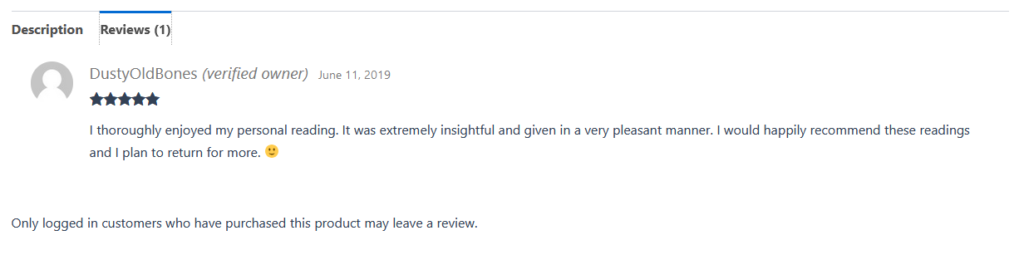
Simply, return to the service/product page you have previously purchased, and the page will load an area for you to fill in a review and stars to rate.